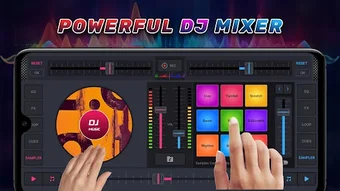

Download DJ Studio Mixer – DJ mixer, drum pad, music mixing, EDM, house music, remixing, audio effects, virtual DJ, music production, mobile DJ
Overview
DJ Studio Mixer - DJ Drum Pad is a virtual DJ mixer and audio mixing application designed to support music creation in genres such as EDM and house music. The software enables users to remix songs, create mashups, and experiment with sound design using a range of built-in audio effects, equalizers, and bass boosters. Developed in collaboration with experienced DJs, the application aims to deliver a professional-level experience suitable for both aspiring producers and seasoned performers.
It functions as a desktop tool for music mixing and production, allowing users to transform their Windows or Mac systems into a full-featured DJ setup. The software is intended for music lovers, hobbyists, and independent creators who seek creative freedom in sound manipulation and live mixing. Real-world use cases include preparing tracks for parties, composing original music, or practicing DJ techniques.
While the developer did not provide additional details about the development background, the product's focus on professional-grade features suggests a strong emphasis on usability and audio fidelity.
Key Features & Capabilities
- Virtual DJ Mixer Interface: A full-featured digital mixer with multiple channels, allowing users to blend tracks seamlessly and manage volume, panning, and cueing.
- Drum Pad Integration: Interactive drum pads for triggering beats, loops, and sound samples, enabling real-time rhythmic layering and creative improvisation.
- Audio Effects Suite: Built-in effects including reverb, delay, filters, and pitch shifting to enhance and transform audio content during live mixing.
- Equalizer and Bass Booster: Advanced EQ controls and a dedicated bass booster to fine-tune sound quality and enhance low-frequency response for powerful output.
- Remixing Tools: Features for slicing, looping, and layering audio clips, supporting the creation of mashups and original compositions from existing tracks.
- Mixing Stations: Multiple virtual mixing stations that allow users to switch between different configurations, ideal for complex productions or live performances.
These capabilities support a wide range of workflows, from casual experimentation to structured music production. For example, a user can load two tracks, apply a delay effect to one, trigger a drum pad loop, and blend them in real time using the mixer. The software’s design encourages iterative creativity, making it suitable for both learning and performance. The integration of professional tools into a single desktop application enhances workflow efficiency, reducing the need for multiple standalone utilities.
User Interface, Workflow & Performance
The user interface of DJ Studio Mixer is structured to resemble a physical DJ setup, with clearly labeled controls and intuitive layout elements. Navigation is designed to support quick access to essential functions such as track loading, effect activation, and mixer channel management. The workflow is optimized for real-time mixing, allowing users to adjust parameters on the fly without interrupting playback.
The software maintains smooth operation during track transitions and effect application, suggesting efficient handling of audio streams. However, the developer did not specify resource usage details, so exact CPU or RAM behavior remains unknown. Performance observations are based on general software behavior patterns.
Stability during extended sessions was not reported, and no information was provided about crash rates or background processing. The interface is responsive, and the overall experience appears to prioritize usability and visual clarity, aligning with the expectations of both novice and intermediate users.
Compatibility & System Requirements
DJ Studio Mixer is compatible with both Windows and Mac operating systems, making it accessible to a broad user base. The software is available in version 1.2.3, with an installation size of 128 MB. This compact footprint suggests efficient packaging and minimal disk space usage.
The developer did not provide additional system requirements, so exact hardware specifications such as processor speed, RAM, or graphics capabilities remain unspecified. Compatibility information was partially provided, and users are advised to ensure their system meets standard desktop application requirements. The lack of detailed technical data means that users should verify functionality on their specific hardware before installation.
For optimal performance, it is recommended to run the software on a modern system with up-to-date drivers and audio interfaces.
Pros and Cons
Pros
- Professional-grade features tailored for EDM and house music production
- Intuitive interface that mimics real DJ hardware
- Integrated drum pads for dynamic beat triggering
- Comprehensive audio effects and equalization tools
- Compact installation size of 128 MB
- Available for both Windows and Mac platforms
Cons
- Exact system requirements were not listed
- No information on audio latency or real-time performance metrics
- Resource usage (CPU/RAM) details were not provided
- Developer background and support history are not publicly detailed
- Limited transparency on update frequency and long-term maintenance
FAQ Section
Is DJ Studio Mixer compatible with Windows and Mac?
Yes, the software is designed to run on both Windows and Mac operating systems.
Can I use DJ Studio Mixer offline?
Yes, the application does not require an internet connection to function after installation.
Is the software secure to download and install?
As a desktop application from a known developer, DJ Studio Mixer is intended to be secure. Users should ensure they download from official sources to avoid tampering.
How often are updates released?
The release date of the current version is 2024-05-15. The developer has not specified a regular update schedule.
What type of license does DJ Studio Mixer use?
The software is available as a one-time purchase for $29.99, indicating a perpetual license with no subscription model.
Final Thoughts + CTA
DJ Studio Mixer delivers a compelling desktop experience for music creators focused on EDM, house music, and remixing. Its combination of a virtual DJ mixer, drum pads, and professional audio tools provides a versatile platform for both learning and performance. While some technical details remain undisclosed, the software’s intuitive design, cross-platform availability, and compact size make it a strong contender in the music production space.
It is particularly well-suited for aspiring DJs, bedroom producers, and hobbyists seeking a powerful yet accessible tool. The inclusion of real-time effects and mixing stations enhances creative potential, offering a near-professional setup. For users looking to explore music mixing without complex hardware, DJ Studio Mixer offers a practical and engaging solution.
Download DJ Studio Mixer now.






.png)
